Returns the user to the main launcher.
Work Space is the operational workspace in UtopiaSystem for approvals, reports, work applications, review tasks, and warehouse-related operations.
In the current deployed system, Work Space replaces the older separated Manager, Supervisor, Admin, and Director spaces with one unified workspace controlled by feature-based permissions.
Work Space is active in the deployed system, but it only appears when the signed-in user has at least one Work-related permission.
| Launcher location | Spaces / Work |
|---|---|
| Launcher behavior | The Work Space card is hidden when the user has no Work permission. |
| Access source | At least one Work-related permission is required. |
| Status | Active |
The purpose of Work Space is to centralize operational work that requires review, approval, reporting, or administration.
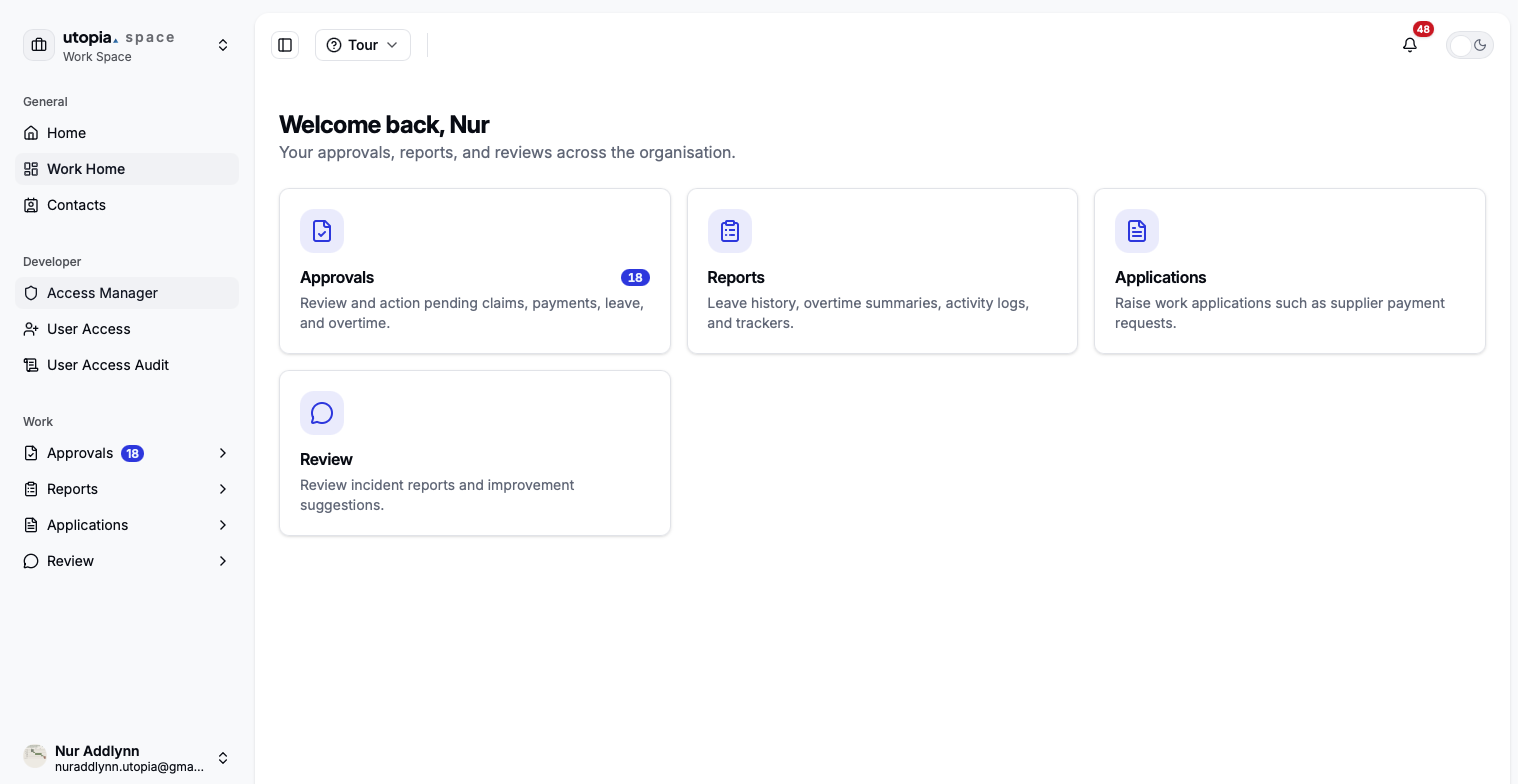
Work Home is the main landing page inside Work Space. It organizes available work features into sections, and users only see sections and items they are allowed to access.
Returns the user to the main launcher.
Opens the Work Space dashboard and available work sections.
Allows users to view employee contact information.
Review and action pending operational requests.
View history, summaries, trackers, and logs.
Submit operational requests for approval.
Review incident reports and improvement suggestions.
Manage inventory, locations, stock movement, and activity records.
Manager views are available from the Launcher through Work Space. The old separate Manager Space is now tracked here as Work Space sections controlled by feature permissions and data scopes.
Launcher → Work Space → choose the visible Approvals, Reports, Applications, or Review section. Finance manager-only finance reviews are under Launcher → Finance Space → Finance Manager Space.
| Manager View | Open From | What Managers Track |
|---|---|---|
| Approval Queue | Work Space / Approvals | One place to review pending requests that the manager is allowed to approve. |
| Leave Approval | Work Space / Approvals | Pending leave applications, leave dates, supporting reason, remarks, and final approval status. |
| Overtime Approval | Work Space / Approvals | Pending overtime requests, overtime hours, approval actions, rejection remarks, and HR verification handoff. |
| Claim Approval | Work Space / Approvals | General claims, SGS claims, supporting receipts, manager approval decision, and finance verification handoff. |
| Supplier Payment Approval | Work Space / Approvals | Supplier payment requests, invoice support, manager approval, director threshold, and account processing handoff. |
| Backcharge Approval | Work Space / Approvals | Backcharge requests, item details, supporting documents, approval status, and finance verification handoff. |
| Leave History | Work Space / Reports | Team leave records, approved or rejected history, reference IDs, and follow-up visibility. |
| Overtime Summary | Work Space / Reports | Team overtime records, totals, approval state, and summary reporting. |
| Petty Cash | Work Space / Reports | Visible petty cash records, employee-level petty cash details, and follow-up status. |
| SPR Tracker | Work Space / Reports | Supplier payment progress, history visibility, approval state, account verification, and AP status. |
| Backcharge Tracker | Work Space / Reports | Backcharge progress, approval state, finance verification, and completion status. |
| Incident Report Review | Work Space / Review | Incident reports submitted by users, review decision, follow-up remarks, and closure state. |
| Improvement Suggestion Review | Work Space / Review | Improvement suggestions, reviewer feedback, responsible level, and completion status. |
| Finance Manager Verification | Finance Space / Finance Manager Space | Finance manager approval and tracking for supplier payment and backcharge finance workflows. |
If a manager cannot see one of these views, check the related feature permission and data scope in Access Control.
Work Space uses feature-based access control. The card appears in the launcher when the user has at least one Work-related permission.
General claims approvalsSGS claims approvalsSupplier payment approvalsBackcharge approvalsLeave approvalsOvertime approvalsDirector approval access
Leave historyOvertime summaryActivity logsPetty cashSupplier paymentBackcharge
Supplier paymentBackcharge
Incident reportsImprovement suggestions
InventoryLocationsActivity log
Workspace view
The Approvals section is used to review and take action on pending requests. Users only see approval queues they have permission to access.
| Approval Area | Permission | Purpose |
|---|---|---|
| General Claims | approvals.claims.general | Approve employee expense claims, usually scoped by business unit or submitter role. |
| SGS Commission | approvals.claims.sgs | Approve SGS commission claim submissions and supporting documents. |
| Supplier Payment | approvals.supplier_payment | Review supplier payment requests and related approval details. |
| Director Supplier Payment | director.approvals.spr.access | Director-level supplier payment approval when required. |
| Backcharge | approvals.backcharge | Review intercompany or operational backcharge requests. |
| Leave | approvals.leave | Review leave applications based on permission and scope. |
| Overtime | approvals.overtime | Review overtime details and approve or reject overtime submissions. |
The Reports section is used to view operational history, summaries, logs, and trackers.
| Report Area | Permission | Purpose |
|---|---|---|
| Leave History | reports.leave_history | Review leave activity and historical leave information. |
| Overtime Summary | reports.overtime_summary | Monitor overtime activity, totals, and summary records. |
| Activity Logs | reports.activity_logs | Review user activity and system action history. |
| Petty Cash | reports.petty_cash | Review, track, and reconcile petty cash records. |
| SPR Tracker | reports.supplier_payment | Monitor supplier payment request progress and details. |
| Backcharge Tracker | reports.backcharge | Review submitted backcharge records and their status. |
The Applications section is used to create work-related requests.
| Application Area | Permission | Purpose |
|---|---|---|
| Supplier Payment Request | applications.supplier_payment | Raise a new supplier payment request for approval. |
| Intercompany Backcharge | applications.backcharge | Create a backcharge request. Visibility depends on deployed navigation and feature configuration. |
The Review section is used to review employee-submitted reports and suggestions.
| Review Area | Permission | Purpose |
|---|---|---|
| Incident Reports | review.incident_reports | Review submitted incidents, evidence, responsible level, and follow-up status. |
| Improvement Suggestions | review.improvement_suggestions | Review submitted suggestions by business unit, department, submitter role, and responsible level. |
The Warehouse section is used for inventory and warehouse administration. These features are shown when warehouse permissions are granted.
| Warehouse Area | Permission | Purpose |
|---|---|---|
| Inventory List | warehouse.inventory | Browse inventory records and manage stock information. |
| Location Management | warehouse.locations | View, add, edit, and delete warehouse locations. |
| Activity Log | warehouse.activity_log | Review warehouse activity, stock changes, and item history. |
These workflows cover Work Space approvals, applications, review queues, and warehouse operations.
Developer tools are visible only to users with developer.workspace.view.
Scopes control which records a user can see inside a feature.
Two users can have access to the same feature but see different records based on their assigned scope.
Recent documentation and system notes.
The display of overtime approval periods has been enhanced for both desktop and mobile. On desktop, 'Start OT' and 'End OT' are now combined into a clearer 'Work Period' column. Mobile approval cards now show more details, including work date, time range, hours, reference, and submitted time. Overtime dates are also formatted correctly, including periods spanning overnight.
Managers and Directors can now find active staff more easily when assigning reviewers in incident reports. The updated search allows you to discover staff regardless of their company, department, or role. The system also ensures that selected staff share at least one business unit with you, and the report's layout has been improved to better display long staff names.
Managers can now approve or deny attendance exception requests, such as emergency partial-day and medical timeslips, directly from their queue in Work Station.
Managers can now review and approve or reject employee requests for missed clock out attendance resubmission directly within the Work space. This new approval flow streamlines the process for correcting attendance records.
The leave approval workflow for managers in the Utopia Work app has been streamlined. HR approval is no longer required after a manager's decision, making the manager's approval final. The user interface and messages have been updated to reflect this simpler process.
Staff using the Utopia Work application can now manually add phone numbers for CC recipients in the Supplier Payment Request (SPR) dialog, even if the person doesn't have a Hub profile.
Resolved an issue that caused 'bad request' errors when tracking and processing supplier payments in the Work Space, improving reliability for financial operations.
The Shift Roster now has improved visibility for draft entries and the edit button, making it easier to manage your work schedules.
The edit button for Shift Rosters in the Work Space now displays correctly, improving usability for managers and schedulers.
Resolved an issue where Shift Roster drafts were incorrectly displayed as published, so status visibility is accurate in roster views.
Shift Roster enhancements were released across Work, HRMS, and Personal. Work overtime approvals now support per-row and select-all checkboxes, an action bar, rejection remarks, and guards against overwriting already actioned requests.
A new Shift Roster report is available under Work → Reports so managers can view and manage employee shift schedules.
Leave and overtime records now show consistent reference codes across Work surfaces, and Manager Leave History has a cleaner table and mobile layout.
Pending approval badges now respect submitter-role filters, so Launcher and Work counts match the actual approval lists users can open.
Resolved an issue where the Supplier Payment Request tracker was not consistently visible in the Manager Supplier Payment History page.
Improved SPR tracker visibility and shared-login stability in the Work app.