Track live operational health and action-required metrics.
UTOPIASYSTEM WORKSPACE
¶ Operation Efficiency Space
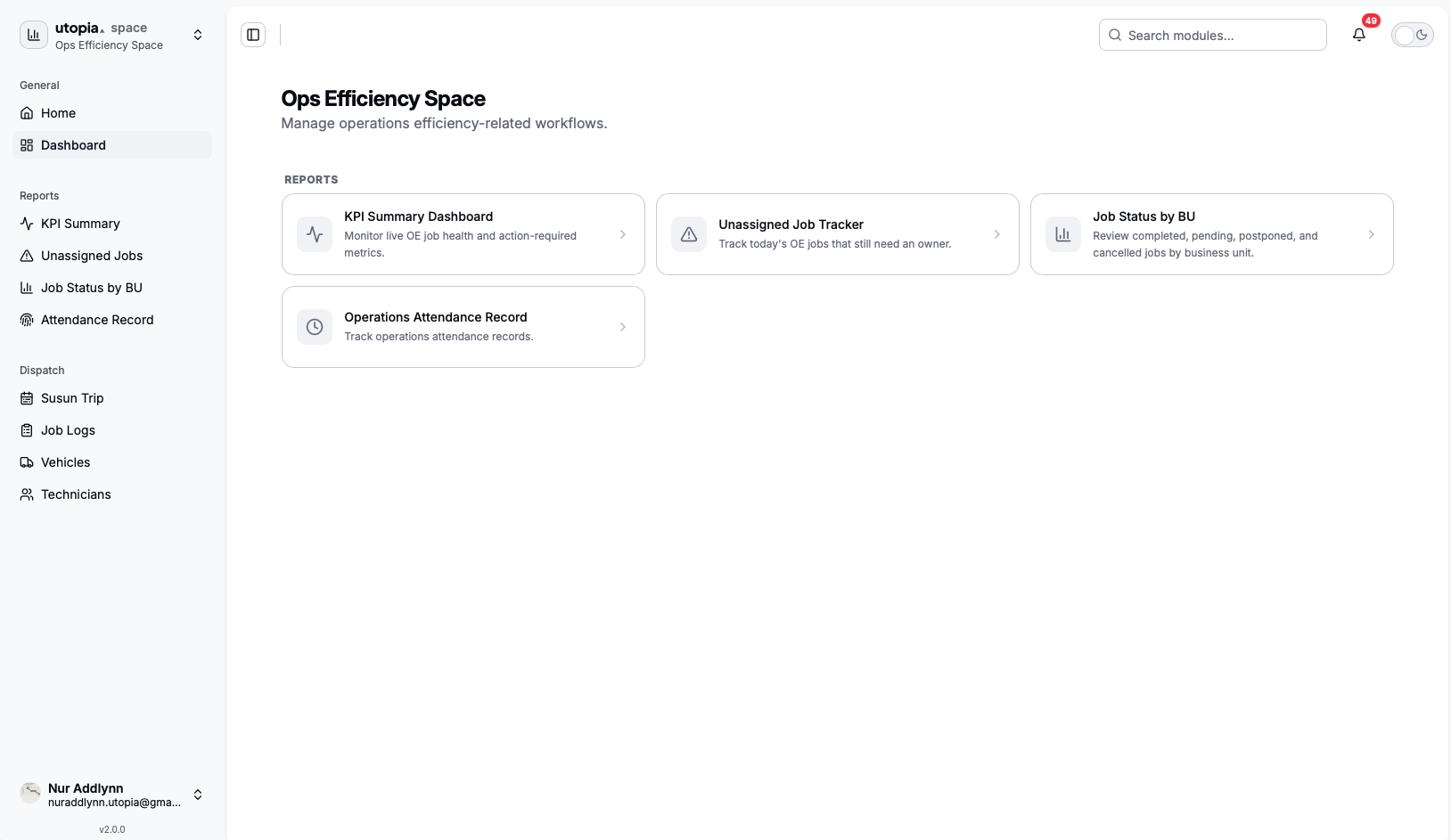
Operation Efficiency Space, also shown as OE Space, is the operations monitoring and dispatch workspace in UtopiaSystem.
It helps operations teams monitor job performance, track unassigned jobs, review job status by business unit, check attendance records, and manage dispatch resources such as trips, job logs, vehicles, and technicians.
¶ Current Status
Operation Efficiency Space is active in the deployed system and appears in the main launcher for users with OE access.
| Launcher location | Spaces / OE |
|---|---|
| Launcher access | ops-efficiency.app.access |
| Workspace access | ops-efficiency.workspace.view |
| Status | Active |
- OE Space appears for users with Operation Efficiency access.
- Users without OE access will not see the OE Space card in the launcher.
- Users without workspace access will not be directed into the workspace.
¶ Product Boundaries and Ownership
Operation Efficiency Space, UtopiaOps, and UtopiaSpace Mobile are separate products. Their names and some shared data can make them look like one application, but each has a different audience, owner, repository, runtime, and integration path.
| Product | Business owner and users | Product boundary | Engineering owner / repository |
|---|---|---|---|
| UtopiaOps | Field Operations; technicians and other field users | Mobile field-work application for operational execution. It owns the field-app experience and its field-specific workflows. See Ops App. | Standalone utopiabuilder/utopiaspace-ops repository |
| UtopiaSpace Mobile | People / HR self-service; employees and managers | Company-wide employee workspace for attendance, leave, claims, overtime, approvals, notifications, payroll-related self-service, and related internal workflows. It is not the UtopiaOps field app. | Mobile product team; utopiabuilder/utopiaspace-mobile |
| Operation Efficiency Space | Operations Efficiency and authorized management users | Web workspace for operational oversight, KPI reporting, attendance review, job monitoring, dispatch planning, job logs, vehicles, and technician management. It is not a mobile client. | UtopiaSpace Core / OE team; utopiabuilder/utopiaspace-core under apps/utopia-oe/frontend and apps/utopia-oe/backend |
Naming rule: use UtopiaOps only for the field-operations mobile product, UtopiaSpace Mobile only for the employee workspace app, and Operation Efficiency Space (or OE Space) only for the web workspace.
¶ Integration Relationships
The three products may participate in related business processes, but they do not form a frontend-to-frontend call chain.
| Product | Primary integration path | Relationship to the other products |
|---|---|---|
| UtopiaOps | Connects directly to the Encik Beku FIELD Supabase project for field authentication, data, and mobile workflows. | Does not call the OE Spring backend. OE may display or coordinate operational data from the same business domain, but UtopiaOps remains an independent client and codebase. |
| UtopiaSpace Mobile | Connects to the UtopiaSpace Supabase platform and associated Edge Functions for employee workflows, notifications, and shared identity. | Shares platform concepts and selected business processes with UtopiaSpace web applications, but it is neither UtopiaOps nor a mobile shell for OE Space. |
| Operation Efficiency Space | The utopia-oe web frontend uses Supabase for shared identity/data and calls the OE Spring backend. The backend resolves the user's Business Unit scope and proxies dashboard/dispatch requests to the appropriate BU API. | Consumes or coordinates operational information for oversight. It does not host UtopiaOps or UtopiaSpace Mobile, and neither mobile app should be routed through the OE backend merely because a workflow is operations-related. |
- Shared identity is not shared ownership: using Supabase or Utopia Hub identity does not make the products the same application.
- Shared records are integration contracts: schema, RPC, Edge Function, notification, or BU API changes must be coordinated with every consuming repository.
- Place changes by user journey: field execution belongs in UtopiaOps; employee self-service belongs in UtopiaSpace Mobile; monitoring and dispatch oversight belong in OE Space.
¶ Purpose
The purpose of Operation Efficiency Space is to help the operations team monitor daily job activity and improve operational visibility.
Identify jobs that still need an owner, technician, or driver assignment.
Review job status, completion, issue rates, and performance across business units.
Validate operations attendance records, timing, locations, and attendance evidence.
Plan trips, schedules, technician workload, and vehicle usage.
Maintain job logs, vehicles, technicians, and dispatch-related records.
¶ Access Control
Operation Efficiency Space is permission-based.
Users need ops-efficiency.workspace.view to access the Operation Efficiency workspace.
This access is generally intended for:
- Operations Efficiency users
- Authorized operations users
- IT users with support access
- Directors or authorized management users
Users without OE access will not see the OE Space card in the launcher and will not be directed into the workspace.
¶ Workspace Structure
Operation Efficiency Space is organized into General navigation, Reports, and Dispatch.
| Area | Purpose |
|---|---|
| General | Home returns the user to the main launcher, while Dashboard opens the Operation Efficiency Space landing page. |
| Reports | Monitoring operational performance, job completion, job ownership, business-unit status, and attendance. |
| Dispatch | Managing operational scheduling, field work assignment, job logs, vehicles, and technicians. |
¶ Dashboard
The OE dashboard is the main landing page for Operation Efficiency Space. It shows available OE modules and includes a search box so users can quickly find the module they need.
Monitor live OE job health and action-required metrics.
Track jobs that do not yet have an assigned owner.
Review job progress and status counts across business units.
Review attendance records for operations-related employees.
¶ Reports
The Reports section focuses on monitoring operational performance, job completion, job ownership, and attendance.
¶ KPI Summary Dashboard 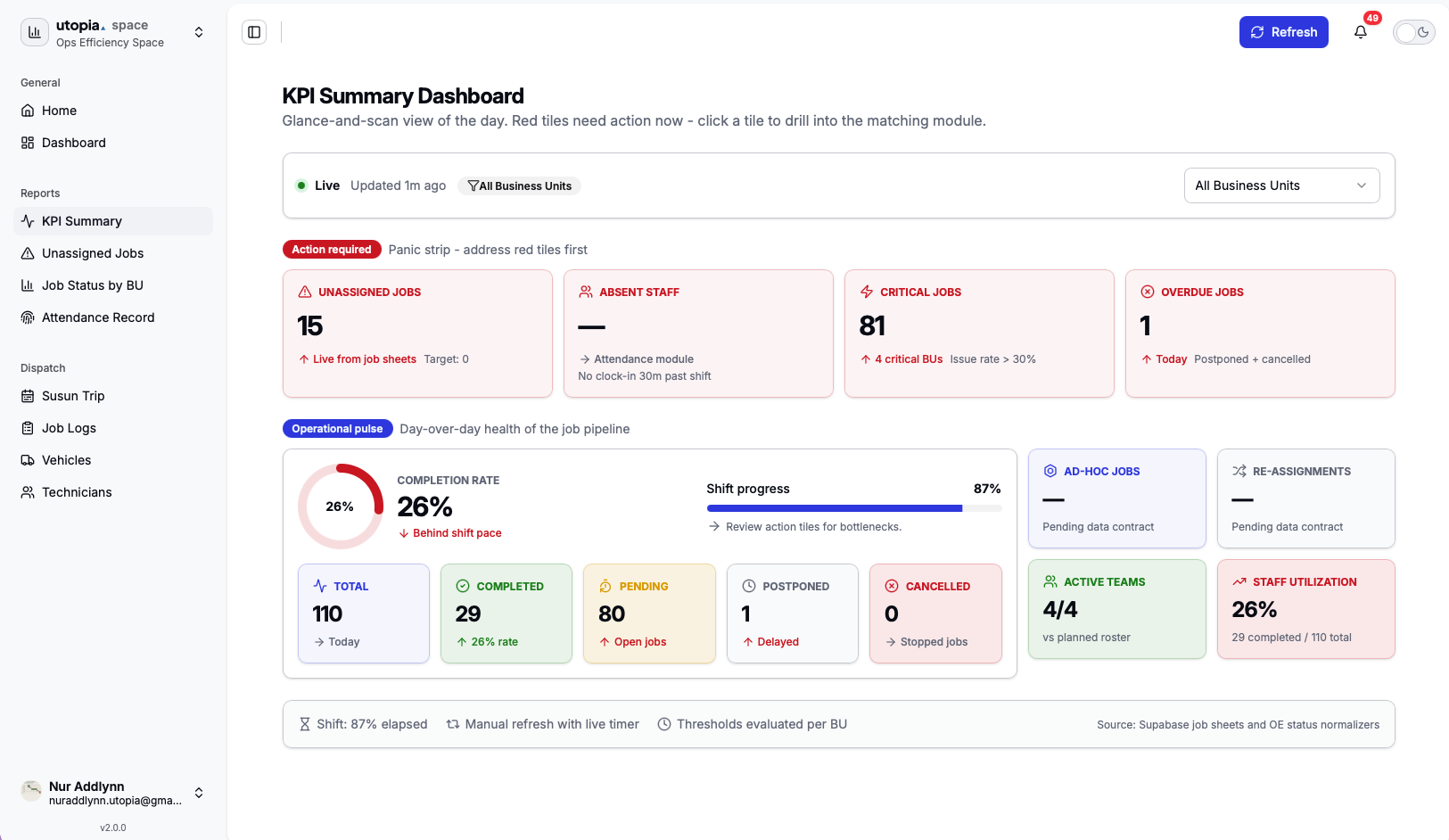
The KPI Summary Dashboard is used to monitor live OE job health and action-required metrics. It helps users understand current operational performance at a high level.
- Job health
- Action-required jobs
- Unassigned and pending jobs
- Completion progress
- Operational issue signals
- Shift progress and live refresh status
¶ Unassigned Job Tracker 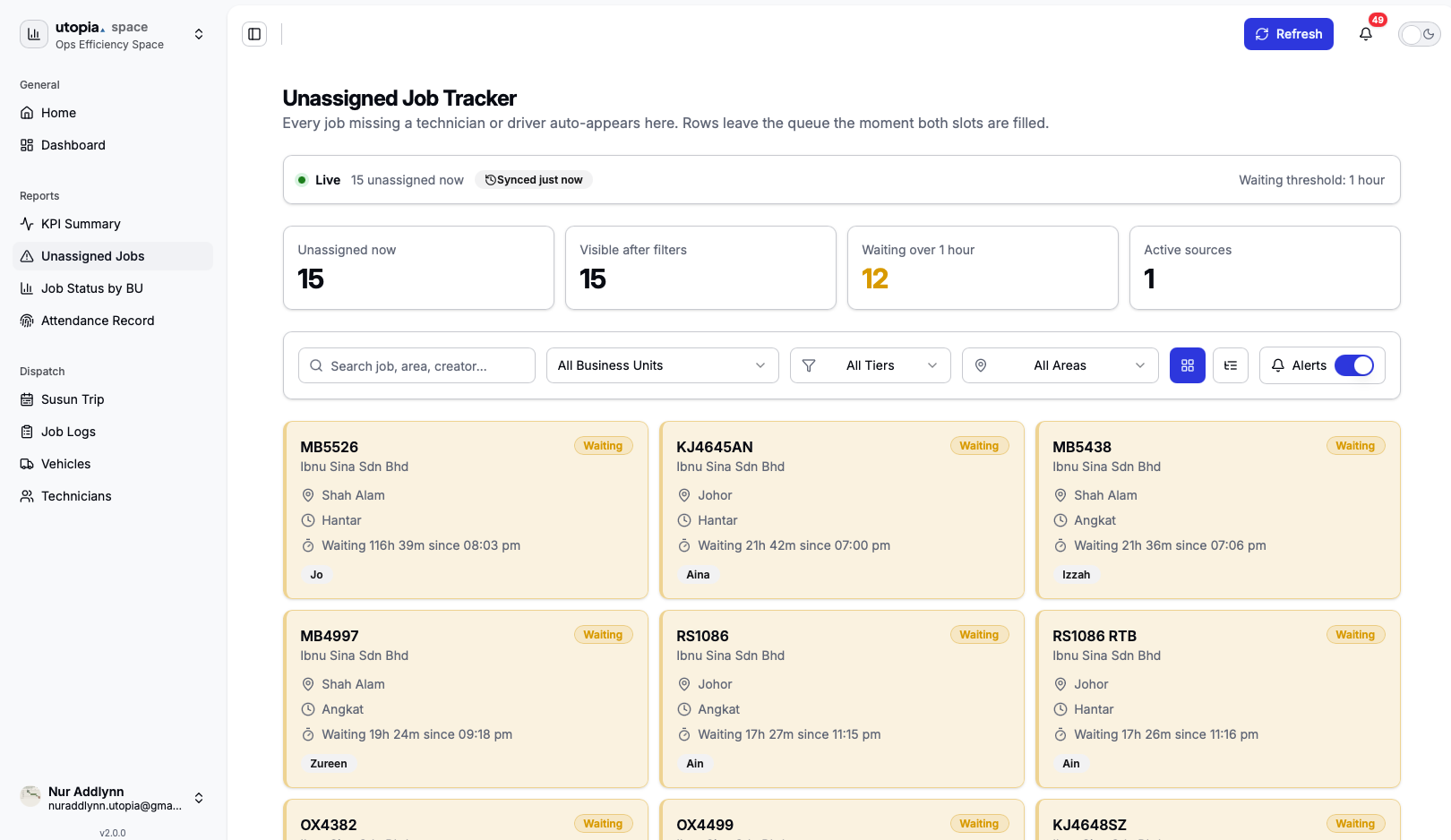
The Unassigned Job Tracker is used to track jobs that do not yet have an assigned owner. It focuses on jobs for the current day that may need action from the operations team.
- Job number, source company, area, and location
- Job time slot, created time, created by, and waiting duration
- Assignment tier, status, and notes
- Operational urgency labels such as New, Waiting, Critical, and Overdue
¶ Job Status by Business Unit 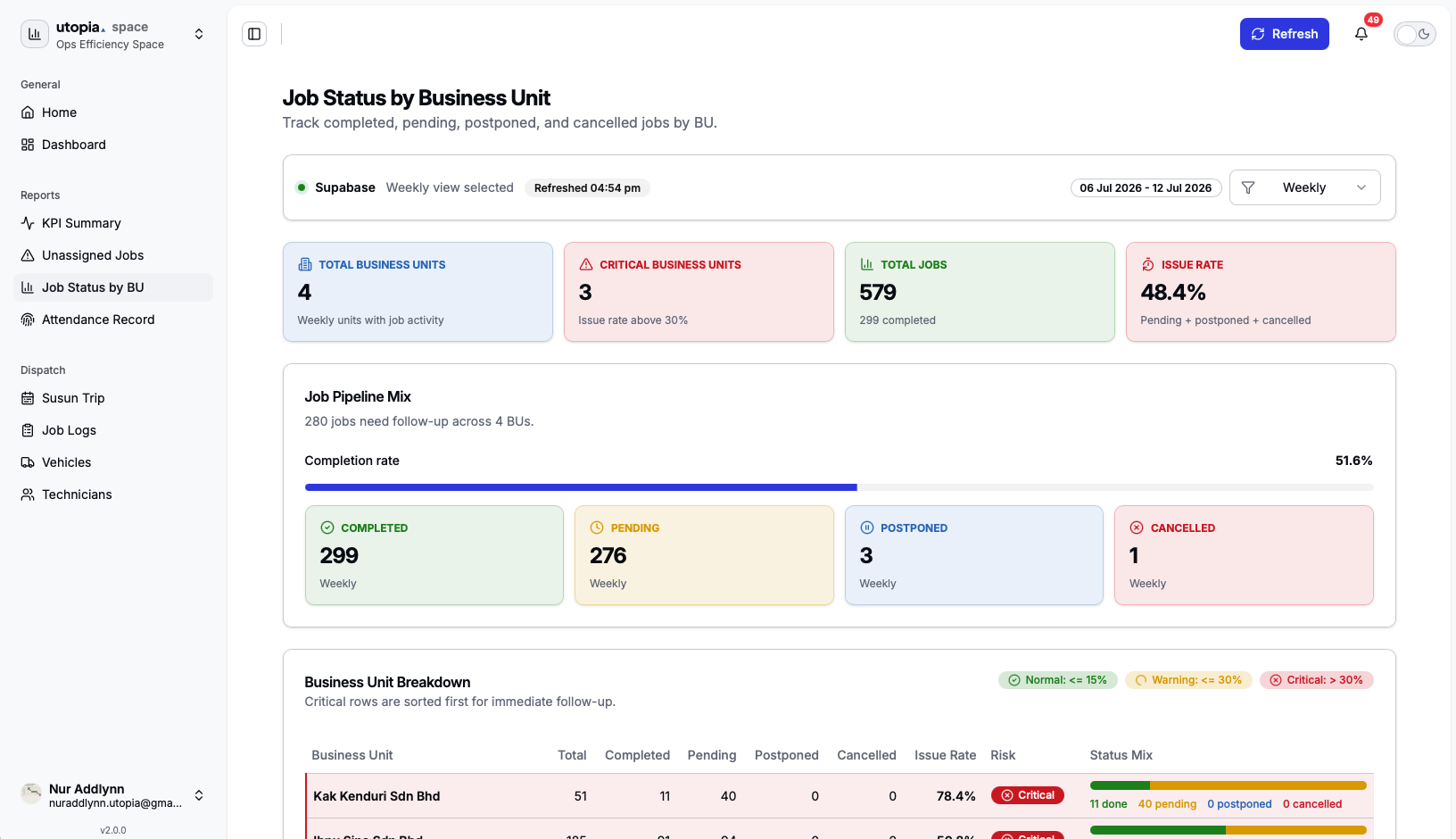
Job Status by Business Unit is used to review job progress across business units and compare performance across daily, weekly, or monthly periods.
- Completed, pending, postponed, cancelled, and total jobs
- Issue rate and completion rate
- Risk indicators such as Normal, Warning, and Critical
¶ Operations Attendance Record 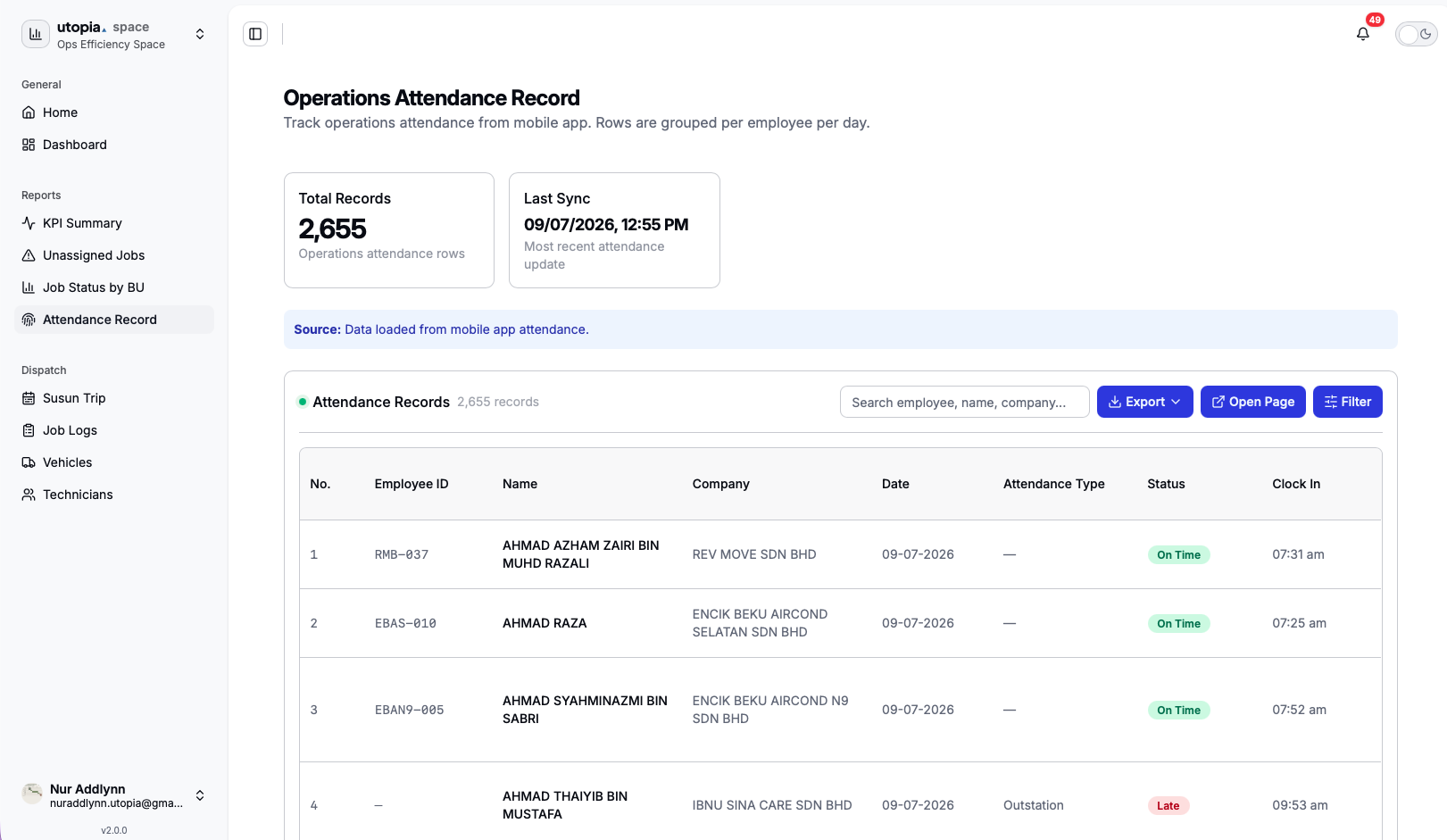
Operations Attendance Record is used to review attendance records for operations-related employees and validate clock-in or clock-out evidence.
- Employee identity, company, work date, attendance type, and status
- Clock-in time, clock-out time, total working time, and sync time
- Clock-in location, clock-out location, clock-in selfie, and clock-out selfie
- Attendance types such as Normal, Outstation, Replace Staff, and Adhoc
¶ Dispatch
The Dispatch section is used to manage operational scheduling and field work assignment.
¶ Susun Trip 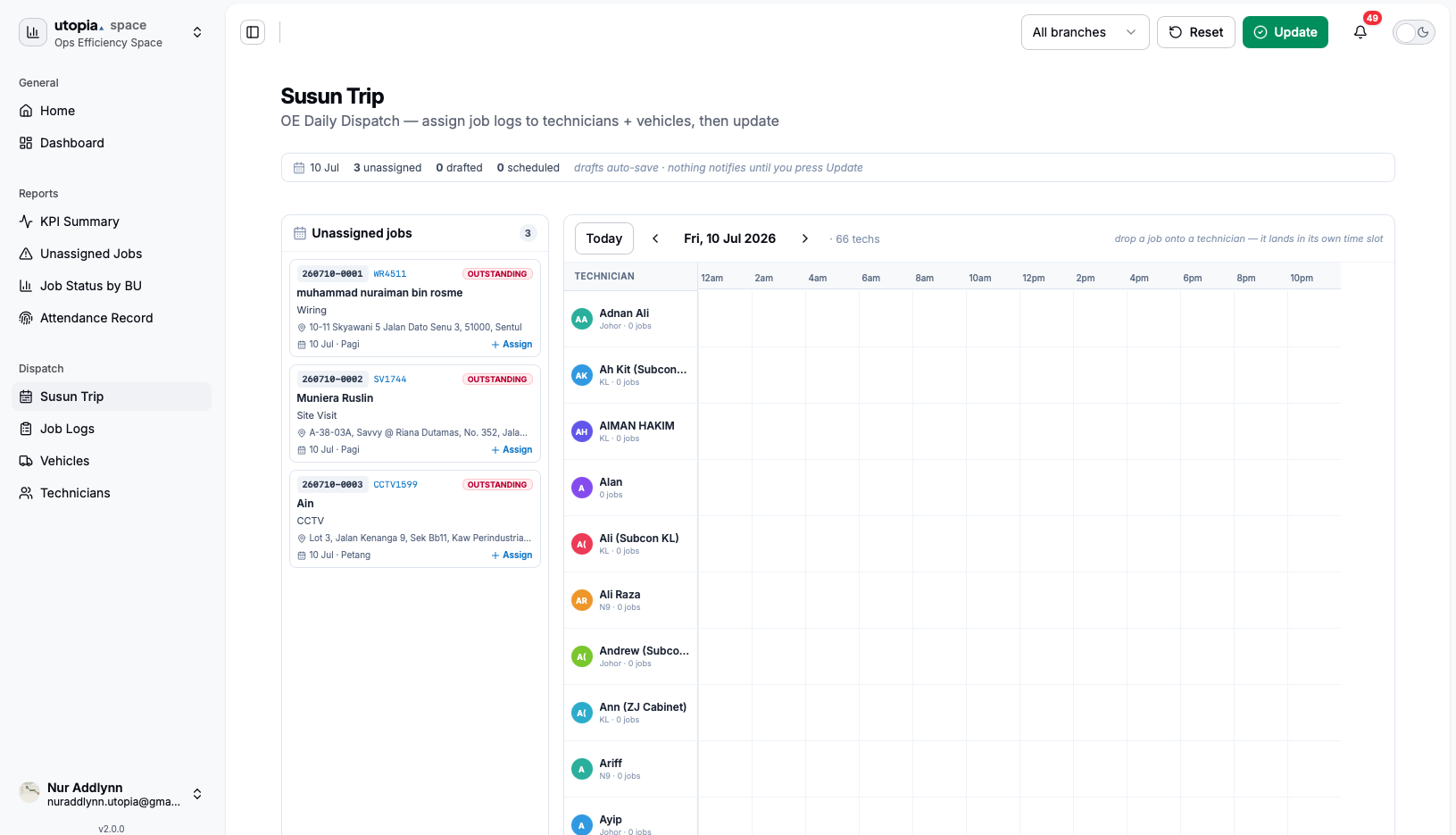
Susun Trip is the dispatch planning board. It is used to assign jobs to technicians and vehicles based on date, branch, time slot, and schedule availability.
- View dispatch queue and dispatch board
- Assign jobs to technicians and vehicles
- Create, delete, and commit draft assignments
- Update start and end times
- Send customer WhatsApp notifications, if enabled
¶ Job Logs 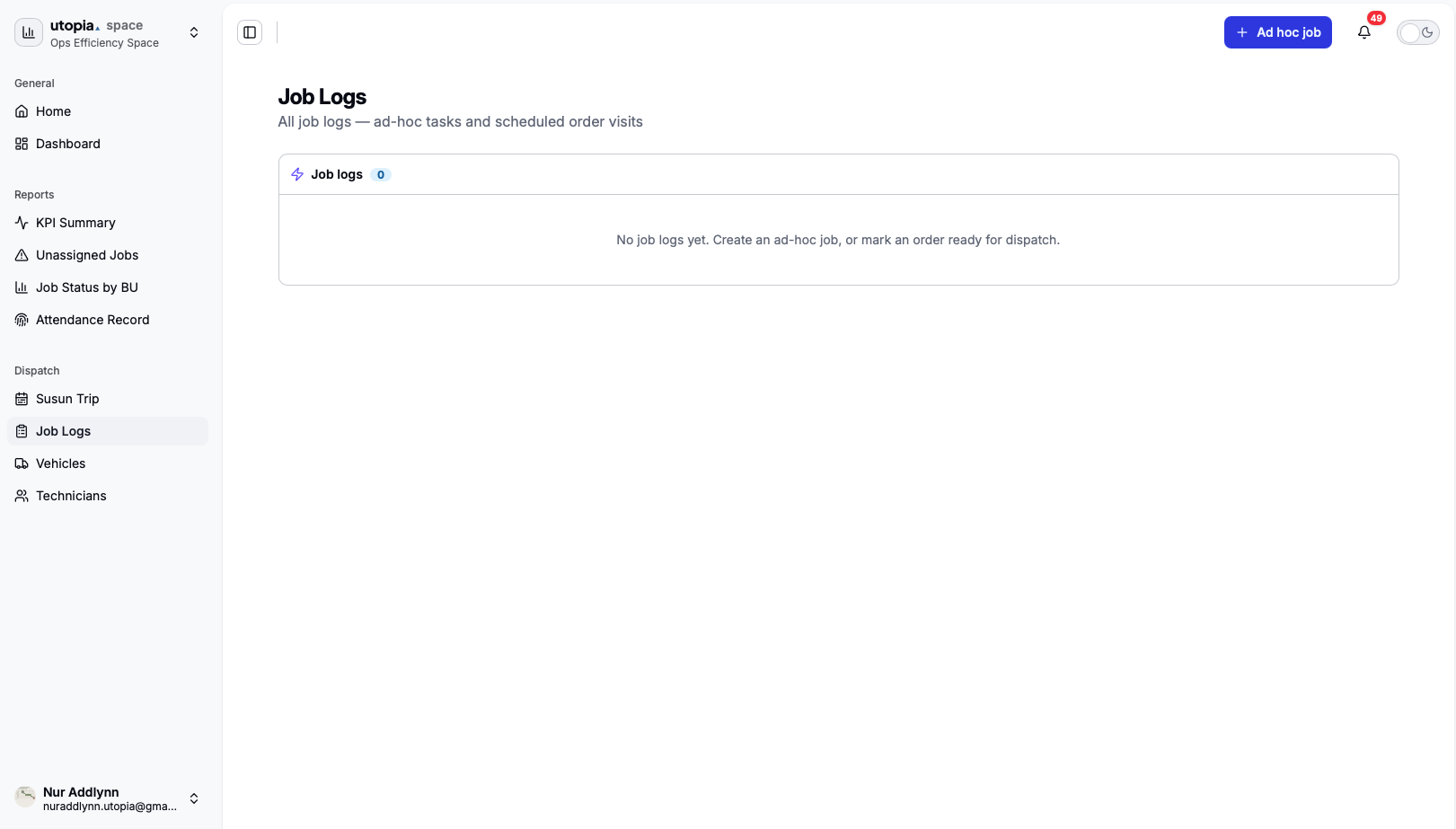
Job Logs shows operational job records, including both ad-hoc jobs and scheduled order visits. Users can also create ad-hoc jobs when work does not originate from a normal order flow.
- Job reference, title, customer, and order number
- Job status, appointment date, appointment slot, start time, and end time
- Service address, assigned technician, assigned vehicle, and notes
¶ Vehicles 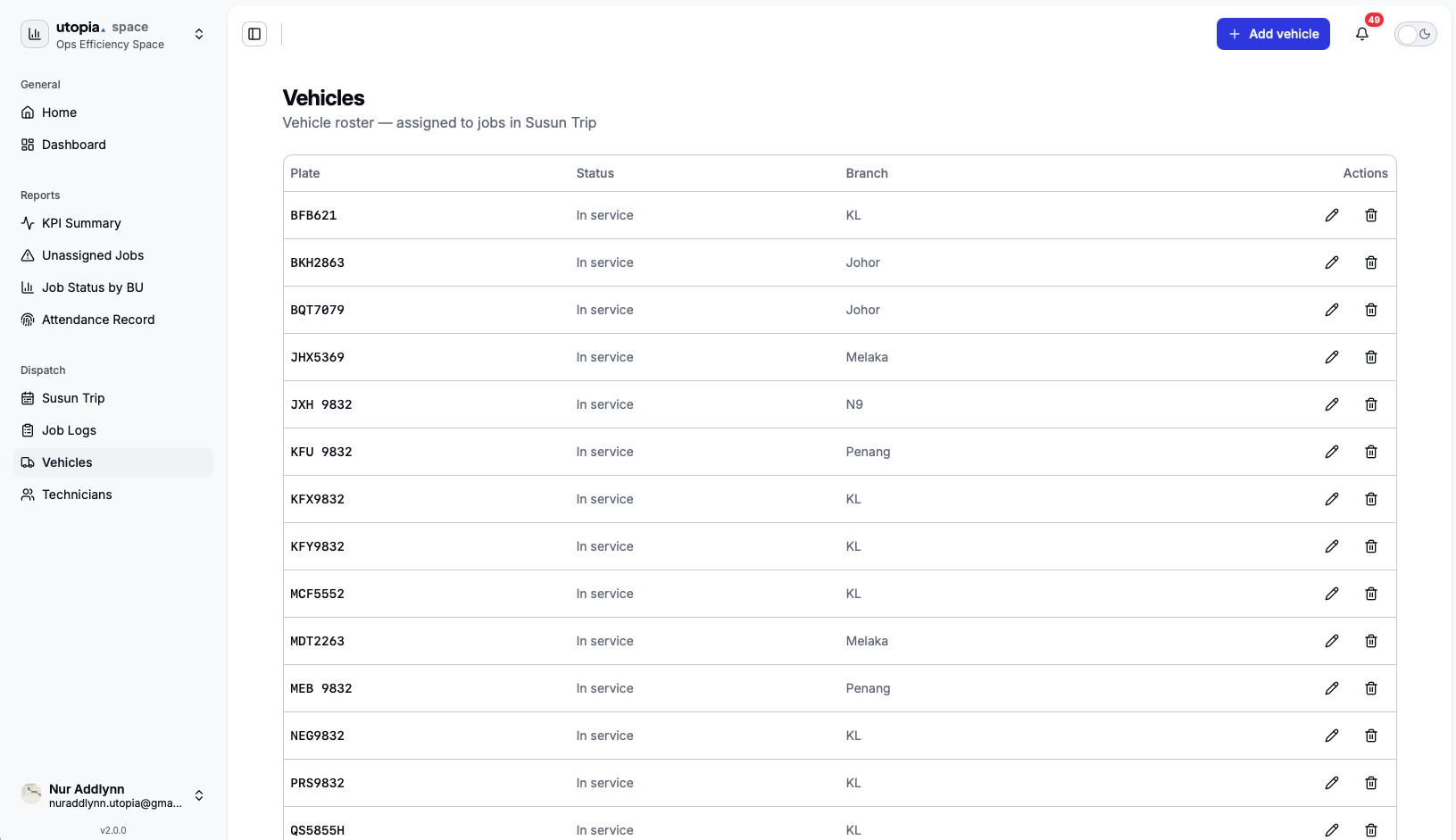
Vehicles is the vehicle roster used by OE dispatch. It stores vehicles that can be assigned to jobs in Susun Trip.
- Plate number, vehicle status, branch, and active status
- Status values such as In service, Under repair, and Retired
- Add, edit, remove, or retire vehicle records
¶ Technicians 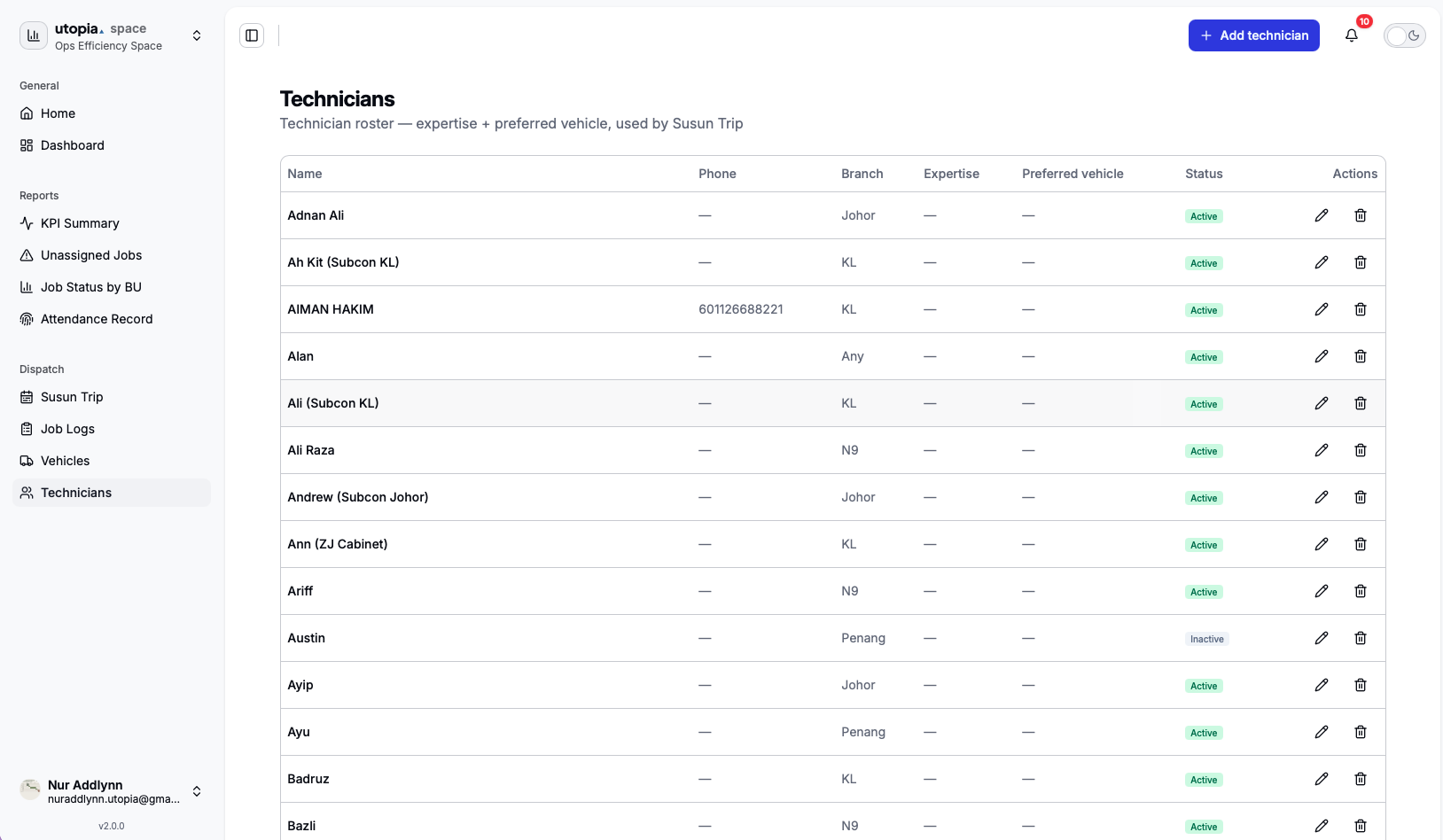
Technicians is the technician roster used by OE dispatch. It stores technician information used when assigning jobs in Susun Trip.
- Name, phone, email, branch, expertise, preferred vehicle, and active status
- Add, edit, remove, or update technician availability
¶ Dispatch Scheduling
Susun Trip uses fixed time slots and supported branches to prepare daily dispatch plans.
| Scheduling Area | Available Options |
|---|---|
| Time Slots | Slot Pagi 9am - 12pm, Slot Tengahari 12pm - 4pm, Slot Petang 4pm - 7pm, Slot Malam 7pm - 10pm |
| Supported Branches | KL, N9, Johor, Penang, Melaka |
¶ Job Sources
OE reports pull job information from multiple operational job sources.
- Encik Beku Aircond Sdn Bhd
- Ibnu Sina Care Sdn Bhd
- Kak Kenduri Sdn Bhd
- Scaffolding Malaysia Sdn Bhd
¶ Backend Integration
Operation Efficiency Space includes a frontend workspace application and a Spring Boot backend service that acts as a proxy for OE dispatch APIs.
| Layer | Endpoint / Scope |
|---|---|
| Frontend calls | /api/oe/* |
| Backend forwards to | /api/v1/oe/* |
| Authentication | The backend uses the user's Supabase session token for authentication. |
| Default backend BU | encik-beku |
The backend proxy is used for OE dispatch features such as:
- Dispatch queue: Retrieve and monitor queued dispatch work.
- Dispatch board: Review scheduled dispatch assignments.
- Technicians and Vehicles: Maintain resources used for field assignments.
- Draft and commit dispatch: Create draft assignments and commit dispatch schedules.
- Job logs: Review operational job records and ad-hoc work.
¶ Feature Summary
Operation Efficiency Space currently includes the following active areas.
- KPI Summary Dashboard
- Unassigned Job Tracker
- Job Status by Business Unit
- Operations Attendance Record
- Susun Trip
- Job Logs
- Vehicles
- Technicians
¶ Application / Form / Request Workflows
These workflows cover the main Operation Efficiency monitoring and dispatch areas.
KPI Summary Dashboard
Unassigned Job Tracker
Job Status
Non-Executive Attendance
OE Calendar
Susun Trip
Job Logs
Technician Updates
Vehicles
¶ Current OE Behavior
Operation Efficiency documentation should describe the active dashboard, dispatch, and identity behavior.
¶ Dashboard and order links
OE screens use clearer date formatting and display order links so teams can move from operational summaries into the related order records.
¶ Identity broker and OE Hub
OE Hub sign-in is supported by an identity broker. Large shared-login sessions require backend header-size handling so /oe/auth/resolve does not fail with 400 errors.
¶ Operational boards and pairing
OE includes the Susun Trip board, Tech Updates page, and mobile pairing API alongside dispatch, job logs, vehicles, and technician management.
Operation Efficiency Space helps the operations team track job health, monitor unassigned work, review job status by business unit, check attendance, plan technician trips, manage job logs, maintain vehicles, and manage technician rosters.